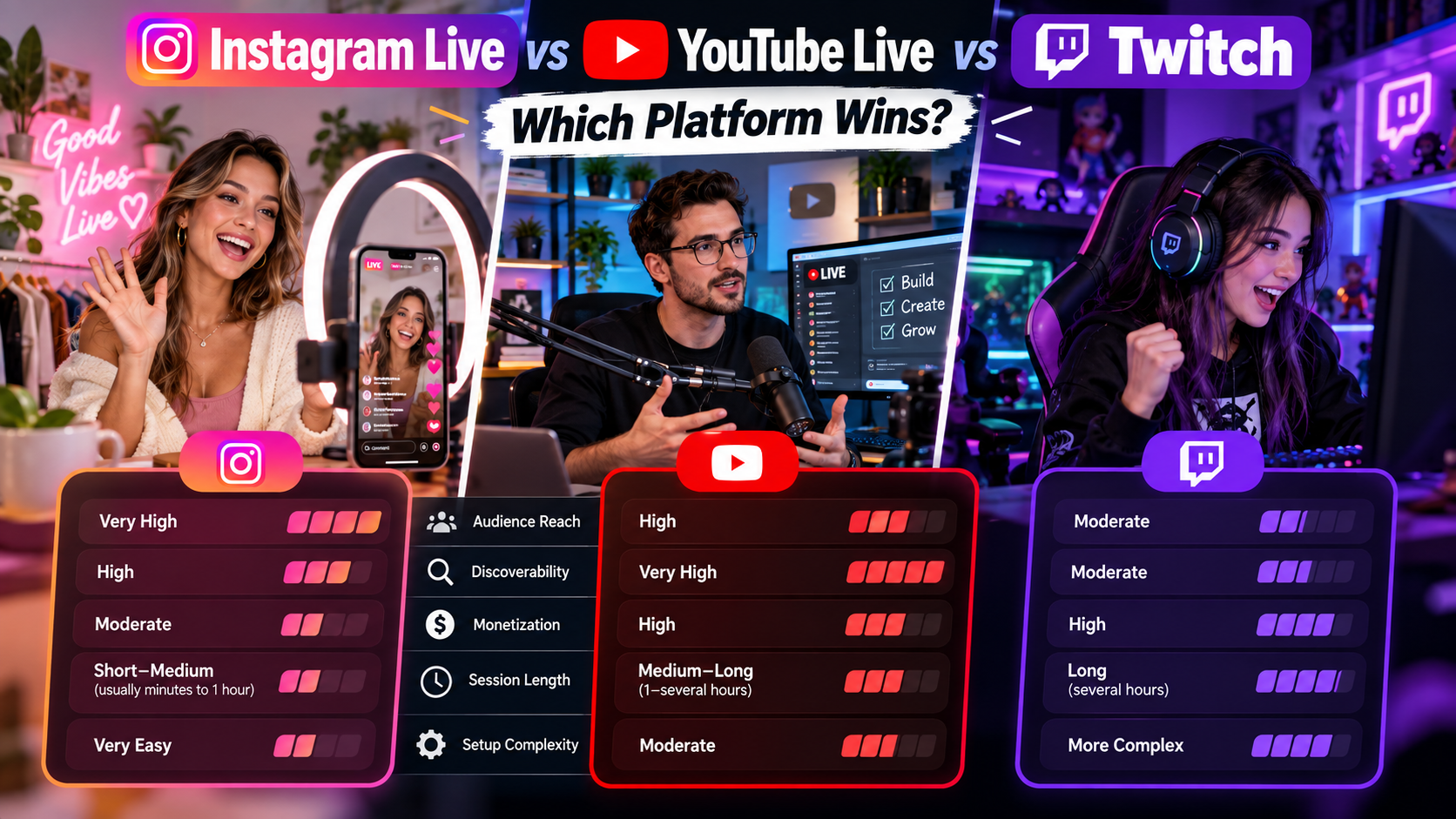
Instagram Live vs YouTube Live vs Twitch: Which Platform Wins?
TL;DR: There is no single winner — the platforms solve different problems. Twitch dominates long-form interactive streaming for gaming communities, YouTube owns evergreen replay value and search traffic, and Instagram Live wins on reach to an existing follower base and impulse discovery. The real decision is where your audience already is — and for most brands and creators that is Instagram. The one historical gap, broadcasting Instagram Live from a desktop encoder, is now closed: platforms like Promovgram give Instagram the OBS/RTMP workflow YouTube and Twitch have always had.
Audience and Discovery: Where Views Come From
Instagram Live pushes notifications to your followers the moment you go live and surfaces the stream at the front of the feed with a pulsing ring around your avatar. Discovery is social-first: your existing audience and their networks drive the views. For a brand with an established following, that is the shortest path from “going live” to “people watching.”
YouTube Live is discovery-driven in the long term. Livestreams become permanent, searchable videos afterwards — a single broadcast can keep pulling viewers for years, and the algorithm suggests lives to people who never followed you. If evergreen value matters, YouTube is unmatched.
Twitch lives in the moment. Its browse directory exposes you to strangers by category, and chat culture rewards streamers who are live often and long. But Twitch discovery outside the platform is weak — few viewers arrive from Google — and the stream itself disappears unless you save it.
Winner: Instagram for reach into an existing audience; YouTube for lasting search traffic; Twitch for in-the-moment community discovery.
Session Limits and Format Flexibility
Instagram Live allows 1 to 4 hours per session depending on account history (new devices are sometimes capped at 1 hour initially). Lives can be saved to your archive or shared as Reels afterwards, but the format favors short, punchy sessions rather than marathon streams.
YouTube Live supports very long sessions — verified accounts can stream 12 hours or more — and every stream becomes a normal video afterward with chapters, comments and analytics that persist.
Twitch is built for endurance: 24-hour streams are routine, and VODs persist (indefinitely for partners, 14–60 days otherwise).
Winner: YouTube and Twitch for duration; Instagram for short, high-attention broadcasts that fit mobile viewing habits.
Monetization Compared
Twitch has the most mature direct monetization: subscriptions, Bits, ads, plus a tipping culture baked into the UI. Full-time streaming income is realistic at scale — but the platform takes roughly half of sub revenue.
YouTube monetizes lives through Super Chat, Super Stickers, memberships and ad revenue, with better long-tail economics because the replay keeps earning. Requirements (1,000 subscribers + watch hours) put monetization out of reach for small channels initially.
Instagram Live monetization is younger — badges in some markets, and primarily indirect: lives drive product sales, bookings, affiliate clicks and follower growth that convert elsewhere. For businesses, the “monetization” of an Instagram live is the sale it produces, not platform payouts — which is often worth more than ad splits.
Winner: Twitch for direct payouts; YouTube for long-tail revenue; Instagram for business conversion.
The Desktop Streaming Gap — and How It Closed
For years the biggest practical difference was production quality. YouTube and Twitch hand every creator an RTMP stream key: paste it into OBS Studio and you have scenes, overlays, alerts and multi-cam production. Instagram gave no public RTMP endpoint, locking creators into phone-app broadcasts with no overlays, no pre-recorded content and no desktop control.
That gap no longer applies. Third-party platforms bridge Instagram to the standard RTMP workflow — Promovgram, for example, connects to your Instagram account and issues a custom RTMP URL and stream key you paste into OBS, vMix, Wirecast or XSplit. Our walkthrough covers how to get your Instagram RTMP stream key step by step. On top of the encoder feed, Promovgram adds the things none of the three platforms bundle together: streaming pre-recorded video as Instagram Live, scheduling the broadcast to start itself, simulcasting to multiple Instagram accounts, and exporting live analytics (viewers, comments, likes).
In other words: you can now run an Instagram Live with the exact same desktop production stack you would use for Twitch or YouTube — same OBS scenes, same overlays, same encoder settings (720p portrait or landscape, 2,500–4,000 kbps, keyframe interval 2s, AAC audio).
Instagram Live vs YouTube vs Twitch at a Glance
Best for existing-audience reach: Instagram Live — follower notifications and feed placement.
Best for evergreen replay and search: YouTube Live — streams become permanent, findable videos.
Best for long-form community streaming: Twitch — marathon sessions and chat culture.
Best for direct payouts: Twitch, then YouTube; Instagram monetizes indirectly through sales and growth.
Best for business and brand broadcasts: Instagram Live — your customers are already there, and desktop scheduling plus pre-recorded streams make it production-grade.
Desktop encoder support: YouTube and Twitch natively; Instagram via Promovgram's RTMP bridge.
Frequently Asked Questions
Can I stream to Instagram Live and YouTube or Twitch at the same time?
Multistreaming to several services at once is a standard encoder feature (OBS plugins, Restream-style services). For Instagram specifically, Promovgram can broadcast one feed to multiple Instagram accounts simultaneously; combining Instagram with YouTube/Twitch in a single session is typically done by feeding both destinations from your encoder setup.
Which platform gives the most viewers for a new account?
Twitch and YouTube expose you to strangers through their browse/discovery systems; Instagram rewards an existing following. With zero audience anywhere, Twitch's category browsing is often the fastest cold start — but if you already have Instagram followers, no other platform will beat notifying them directly.
Is Instagram Live quality as good as YouTube or Twitch?
Instagram caps around 720p and roughly 4 Mbps, below YouTube's 1080p/4K ceiling, but with a desktop encoder feeding a clean 2,500–4,000 kbps stream the difference is negligible on a phone screen — which is where nearly all Instagram viewing happens.
Do Instagram lives get deleted after they end?
No — you can save a finished live to your archive or share it as a Reel. Promovgram includes save-to-Reels options directly in the broadcast settings.
Which platform should a business choose?
Wherever your customers already follow you. For most consumer brands that is Instagram, and with scheduled, pre-recorded desktop broadcasts it now supports the same professional production as the streaming-native platforms — see pricing and the free 7-day trial to test the full workflow.
Conclusion
Twitch wins endurance and community, YouTube wins replay and search, Instagram wins reach and conversion. The choice is not really “which platform is best” but “where is my audience” — and once that answer is Instagram, the old production-quality objection no longer holds. With a desktop RTMP bridge you get OBS-grade broadcasts, scheduling and analytics on Instagram Live too. Try it free for 7 days and see what Instagram Live looks like from your PC.